


1. React 16.8 Hooks 업데이트로 달라진 점
React 16.8부터 Hooks가 도입되면서, 함수형 컴포넌트에서도 state 관리와 생명주기 로직을 사용할 수 있게 되었습니다.
이 변화는 단순히 문법이 바뀐 것이 아니라, 컴포넌트 설계 방식 자체를 바꾸는 전환점이었습니다.
아래에서 클래스 컴포넌트 방식과 Hooks 방식을 코드로 직접 비교해보겠습니다.
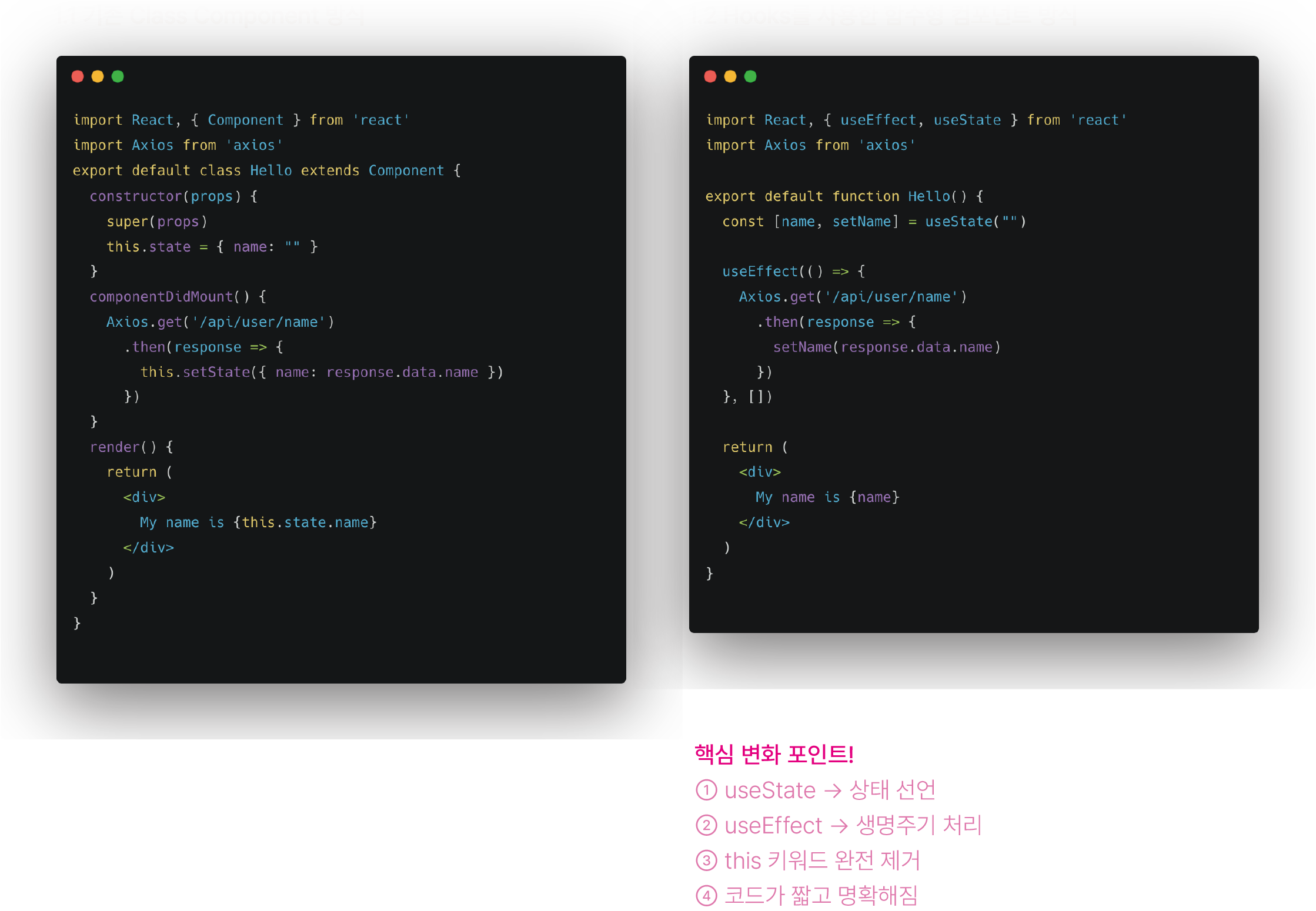
What Changed with the React 16.8 Hooks Update
JayTak
2. useEffect는 여러 생명주기를 하나로 통합한다
2.1 Class Component에서의 중복된 생명주기 로직
componentDidMount() {
  this.updateLists(this.props.id)
}

componentDidUpdate(prevProps) {
  if (prevProps.id !== this.props.id) {
    this.updateLists(this.props.id)
  }
}

updateLists = (id) => {
  fetchLists(id)
    .then(lists => this.setState({ lists }))
}
- 같은 로직이
componentDidMount,componentDidUpdate에 나뉘어 있음 - props 변화 조건을 직접 비교해야 함
- 코드 흐름을 한눈에 파악하기 어려움
2.2 Hooks 방식: useEffect 하나로 해결
useEffect(() => {
  fetchLists(id)
    .then((repos) => {
      setRepos(repos)
    })
}, [id])
이 코드가 의미하는 것
- 컴포넌트 마운트 시 실행
id값이 변경될 때마다 다시 실행componentDidMount + componentDidUpdate역할을 동시에 수행
📌 의존성 배열 [id]가 핵심
- 빈 배열
[]→ 최초 1회 실행 - 값이 있는 배열 → 해당 값이 바뀔 때만 실행
3. Hooks로 인해 얻는 또 다른 이점들
3.1 로직 중심으로 코드가 재구성됨
- 생명주기 기준 ❌
- 기능/로직 기준으로 코드 작성 ⭕
3.2 Custom Hook으로 로직 재사용 가능
function useUserName() {
  const [name, setName] = useState("")

  useEffect(() => {
    Axios.get('/api/user/name')
      .then(res => setName(res.data.name))
  }, [])

  return name
}
const name = useUserName()
3.3 테스트와 유지보수가 쉬워짐
- 순수 함수에 가까운 구조
- 상태와 로직의 의도가 명확
- 사이드 이펙트가
useEffect로 명시됨
TicTacToe_1. 클래스 컴포넌트를 함수형 컴포넌트로 바꾸기
1.1 컴포넌트 형태 변경
export class Board extends Component {
  render() {
    return (...)
  }
}
이를 함수형 컴포넌트로 바꾸면 다음과 같습니다.
const Board = () => {
  return (...)
}
핵심 포인트
class,extends Component제거render()메서드 제거- JSX는 함수의
return으로 바로 반환
👉 컴포넌트 자체가 하나의 함수가 됨
TicTacToe_2. state를 useState Hook으로 변환하기
2.1 기존 클래스 방식의 state
constructor(props) {
  super(props);
  this.state = {
    squares: Array(9).fill(null),
  };
}
2.2 Hooks 방식
const [squares, setSquares] = useState(Array(9).fill(null));
squares→ 현재 상태setSquares→ 상태 변경 함수useState→ 초기 state를 생성하는 Hook
TicTacToe_3. 클릭 이벤트와 상태 업데이트
const handleClick = (i) => {
  const newSquares = squares.slice();
  newSquares[i] = 'X';
  setSquares(newSquares);
};
핵심 포인트
slice()로 기존 상태를 복사- React의 불변성 원칙 유지
- 직접 수정 ❌ → 새 배열 생성 ⭕
TicTacToe_4. Square 컴포넌트 분리 + 구조 분해 할당
const Square = ({ onClick, value }) => {
  return (
    <button className="square" onClick={onClick}>
      {value}
    </button>
  );
};
핵심 포인트
props.onClick,props.value대신- 구조 분해 할당(destructuring) 사용
- 코드 가독성 ↑
TicTacToe_5. 턴 관리: X → O 순서 만들기
5.1 다음 플레이어 상태 추가
const [xIsNext, setXIsNext] = useState(true);
true→ X 차례false→ O 차례
5.2 클릭 시 X / O 결정
newSquares[i] = xIsNext ? 'X' : 'O';
setXIsNext(current => !current);
왜 함수형 업데이트를 쓰는가?
setXIsNext(current => !current);
핵심 포인트
👉 이전 상태를 항상 안전하게 보장 👉 연속 setState 호출 시 버그 방지
TicTacToe_6. 상태 기반 렌더링 (status 텍스트)
const status = `Next player: ${xIsNext ? 'X' : 'O'}`;
TicTacToe_7. 승자 결정 로직 분리
7.1 승리 조건 정의
function calculateWinner(squares) {
  const lines = [
    [0,1,2],[3,4,5],[6,7,8],
    [0,3,6],[1,4,7],[2,5,8],
    [0,4,8],[2,4,6],
  ];

  for (let i = 0; i < lines.length; i++) {
    const [a, b, c] = lines[i];
    if (
      squares[a] &&
      squares[a] === squares[b] &&
      squares[a] === squares[c]
    ) {
      return squares[a];
    }
  }
  return null;
}
핵심 포인트
- 승리 패턴을 데이터 구조로 정의
- 로직을 컴포넌트 밖으로 분리
- 테스트 & 재사용 가능
TicTacToe_8. 승자 표시하기
const winner = calculateWinner(squares);
let status;

if (winner) {
  status = 'Winner: ' + winner;
} else {
  status = `Next player: ${xIsNext ? 'X' : 'O'}`;
}
TicTacToe_9. 클릭 방지 처리 (게임 종료 & 중복 클릭)
const handleClick = (i) => {
  const newSquares = squares.slice();

  if (calculateWinner(newSquares) || newSquares[i]) {
    return;
  }

  newSquares[i] = xIsNext ? 'X' : 'O';
  setSquares(newSquares);
  setXIsNext(current => !current);
};
방지 조건
- 이미 승자가 있는 경우
- 이미 채워진 칸을 클릭한 경우